The clock is ticking, the submission portal closes in a few hours, and your screen is flooded with aggressive red text. Every programmer, from a high school student writing their first loop to a senior software engineer deploying global infrastructure, knows this exact moment of panic. You hit the run button, expecting your code to execute smoothly, but instead, the compiler slams the brakes. It refuses to build.
When you are staring at a screen full of errors, the natural reaction is to randomly change lines of code, hoping something magically clicks. This approach rarely works and usually introduces three new bugs for every one you try to fix. Instead of letting frustration take over, you need a repeatable, systematic strategy to isolate the issue, fix the syntax, and get your project past the finish line. Turning a chaotic wall of errors into a functioning program simply requires a shift in how you look at the problem.
Faced with mounting deadlines and complex instructions, many students realize that trying to juggle advanced programmatic logic alongside other heavy course modules is an unnecessary bottleneck. In these high-pressure situations, deciding to do my assignment with the direct technical support of myassignmenthelp allows you to access production-grade syntax layouts and clean reference architectures, ensuring your foundational logic compiles perfectly without sacrificing your sleep or your GPA. Taking a step back to look at verified code examples can instantly clear up the confusion that keeps a script from running.
1. Decode the Compiler’s Feedback Matrix
The biggest mistake you can make is treating a compiler error like an insult. A compiler isn’t telling you that your code is bad; it is giving you a precise map to the exact location where the rules of the language were broken. To fix the issue, you must learn to read this feedback properly rather than closing the terminal out of frustration.
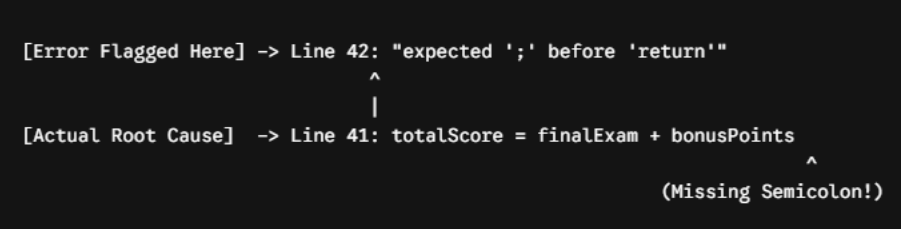
Most error messages follow a strict structure: the file name, the specific line number, the character column where the issue was detected, and a short descriptive label. If the compiler flags line 42, that is your starting point. However, keep in mind that the actual mistake often happens slightly before the flagged line. For instance, if you forget a closing bracket or a semicolon on line 41, the compiler might not realize anything is wrong until it tries to read line 42 and encounters unexpected text.
Start your investigation by reading the very first error at the top of your terminal. When a program fails to compile, a single missing character at the top of the file can cause a massive chain reaction, triggering fifty subsequent errors down the line. Do not waste time trying to fix error number forty-five. Scroll all the way up, isolate the initial breaking point, and address that single issue first. Frequently, fixing that top line causes the remaining forty-nine errors to vanish instantly.
2. Identify the Core Error Category
Not all compilation failures are created equal. Before you can deploy a tactical fix, you need to know exactly what kind of barrier the computer has hit. Compilers generally sort their complaints into distinct buckets, and understanding these categories helps you know exactly which part of your project to audit.
| Error Category | Common Terminal Message | Real-World Meaning | Tactical Fix |
| Syntax Error | expected ‘;’, unclosed string literal, mismatched parentheses | The code breaks the grammar rules of the programming language. | Check for missing punctuation, brackets, or typos in keywords. |
| Type Mismatch | cannot convert ‘String’ to ‘int’, invalid operand types | You are trying to perform an operation on incompatible data types. | Use explicit data conversion functions or recheck variable declarations. |
| Declaration Error | cannot find symbol,variable X not declared in this scope | The computer has no idea what a specific word or variable means. | Check for spelling typos or ensure libraries are properly imported at the top. |
| Linker Error | undefined reference to functionX,ld returned 1 exit status | The code syntax is fine, but the system cannot find the underlying files to assemble the app. | Verify that all project files are included in the compilation build command. |
By categorizing the message into one of these fields, you stop guessing blindly. If the terminal flags a “Type Mismatch,” you do not need to look for missing semicolons; instead, you immediately inspect how your data is being passed between functions.
3. Execute the “Divide and Conquer” Slicing Strategy
When you are working with a large script containing multiple functions, loops, and data structures, finding a hidden bug can feel like searching for a needle in a haystack. If looking at the code as a single block isn’t working, you need to break it down into smaller, manageable sections. This technique is known as the “divide and conquer” or code-slicing method.
The fastest way to execute this is by safely commenting out chunks of recent work. By turning blocks of suspect code into temporary text comments, you prevent the compiler from reading them. Comment out everything except the absolute core functionality of your program—the bare minimum required to start up. Hit compile. If the program builds successfully, you now know with absolute certainty that your core foundation is clean.
From there, begin uncommenting your code section by section, re-compiling after each piece you bring back to life. The moment the compiler throws an error again, you have successfully cornered the bug. It lives inside the specific block you just reactivated. This approach saves hours of aimless scrolling because it narrows your focus from a thousand lines of code down to a single ten-line function.
4. Leverage Print Debugging and Variable Auditing
Once you have isolated the section of code causing the crash, you need to inspect what is happening inside the computer’s memory while the program attempts to run. Many compilation failures or instant runtime crashes occur because variables are holding data types or values that the programming language doesn’t allow.
This is where print statements become your best friend. Insert temporary lines of code that print the values of your variables to the screen right before the section that causes the build to fail. If a function expects a whole number (an integer) but your calculations are accidentally generating a decimal number (a float) or a piece of text (a string), the compiler will reject the program to prevent a massive system crash later on.
Checking these readouts lets you verify that your data matches what the language requires. Are your arrays holding the correct number of items? Are your loops attempting to count past the end of a list? Seeing the actual numbers displayed in your terminal makes abstract logic errors instantly visible, turning a guessing game into a straightforward fix.
5. Reverse-Engineer the Language Rubric
Programming languages are incredibly rigid. Humans can read a sentence with a missing comma and still understand the point, but a computer cannot. A single mismatched uppercase letter, an incorrect indentation space, or a forgotten bracket will cause the entire system to stop dead in its tracks.
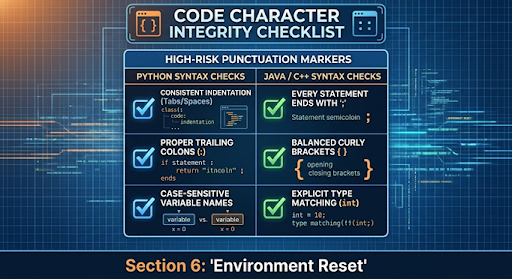
When standard fixes fail, the best approach is to open up your course documentation or language manuals and compare your script side-by-side with a verified, working example. Check the exact syntax rules for the language you are using. For example, a Python script relies strictly on invisible spaces and tabs to understand where a loop ends, whereas languages like Java or C++ depend entirely on curly brackets and semicolons. If you switch between languages during a busy semester, it is incredibly easy to accidentally mix up these structural rules.
If you find yourself stuck in a loop of constant terminal crashes while trying to balance these strict language structures, utilizing Programming Assignment Help can instantly streamline your workflow by providing access to verified, bug-free algorithmic models. Studying professionally structured scripts shows you exactly how to align your custom variables with strict university grading criteria, helping you learn the correct syntax rules faster for your next project.
6. Clean the Build Environment and Start Fresh
Sometimes, the bug isn’t living inside your source code at all. It might be hidden deep within your computer’s temporary memory or old, cached compilation files. As you write, test, and rewrite a program, the software you use to compile your code can occasionally get confused by storing remnants of older versions of your project.
If your code looks completely flawless but the terminal continues to throw bizarre errors that don’t make sense, it is time to perform an environment reset. Most modern programming tools have a button or a command labeled “Clean Project” or “Rebuild.” Running this command completely wipes away any temporary files the computer generated during your previous failed attempts.
Think of it as clearing the clutter off a workspace before starting a complex task. Forcing the compiler to read your source files completely from scratch ensures that you are testing your current logic, not an accidental leftover piece of data from an hour ago. If a clean rebuild still fails, you can rest assured that the issue is a tangible syntax error rather than a computer glitch.
7. Step Away and Apply the Rubber Duck Method
When you spend four hours straight staring at the exact same lines of text, your brain naturally gets tired. Your eyes begin to skip over obvious mistakes, reading what you intended to write instead of what is actually typed on the screen. The harder you look, the less you see.
This is why experienced developers rely on a famous technique called “Rubber Duck Debugging.” The concept is simple: you place an imaginary listener or a physical object, like a rubber duck, on your desk and explain your code to it line by line. You must explain what every single function is supposed to do, what data enters it, and what result comes out.
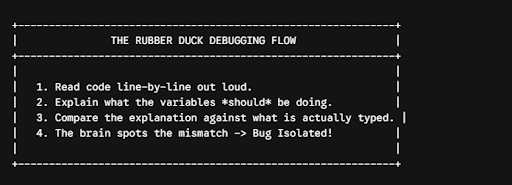
Speaking out loud forces your brain to process the information using a completely different mental pathway. Somewhere mid-sentence, as you tell the duck, “And then this loop adds five to the variable,” you will suddenly look down and realize you accidentally typed a minus sign instead. If the duck doesn’t help, close your laptop, grab a glass of water, and walk away for fifteen minutes. Giving your mind a short break allows you to return with fresh eyes, and the hidden typo that caused the compile error will often pop out at you within seconds.
Frequently Asked Questions
Q: Why does the compiler flag a specific line when the code looks correct?
A: Compilers read code sequentially. If you miss a character like a bracket or semicolon on a previous line, the computer often doesn’t recognize the error until it tries to process the following lines, causing it to flag the wrong location.
Q: What should I do first when a program displays dozens of errors at once?
A: Always scroll to the very top of the terminal and fix the first error listed. A single typo near the beginning of a file often causes a massive chain reaction of minor errors throughout the rest of the script.
Q: How does commenting out sections of code help with debugging?
A: It temporarily hides complex blocks from the compiler so you can test your core logic in isolation. If the program runs cleanly without those sections, you know the issue is trapped inside the code you hidden away.
Q: What is the benefit of explaining a broken script out loud?
A: Verbalizing your logic forces your brain to process information through a different mental pathway. When you state what a line of code is supposed to do, you immediately spot the visual mismatch with what you actually typed.
About The Author
Ella Thompson is an academic content strategist at myassignmenthelp, where she specializes in developing high-performance study frameworks and educational resources that empower students to master complex coursework.